Steno: Always Listening, Always Queryable
March 28, 2026
This is Part 2 about Steno, a private speech-to-text tool for macOS. Part 1 covers building the initial TUI with macOS 26’s SpeechAnalyzer API.
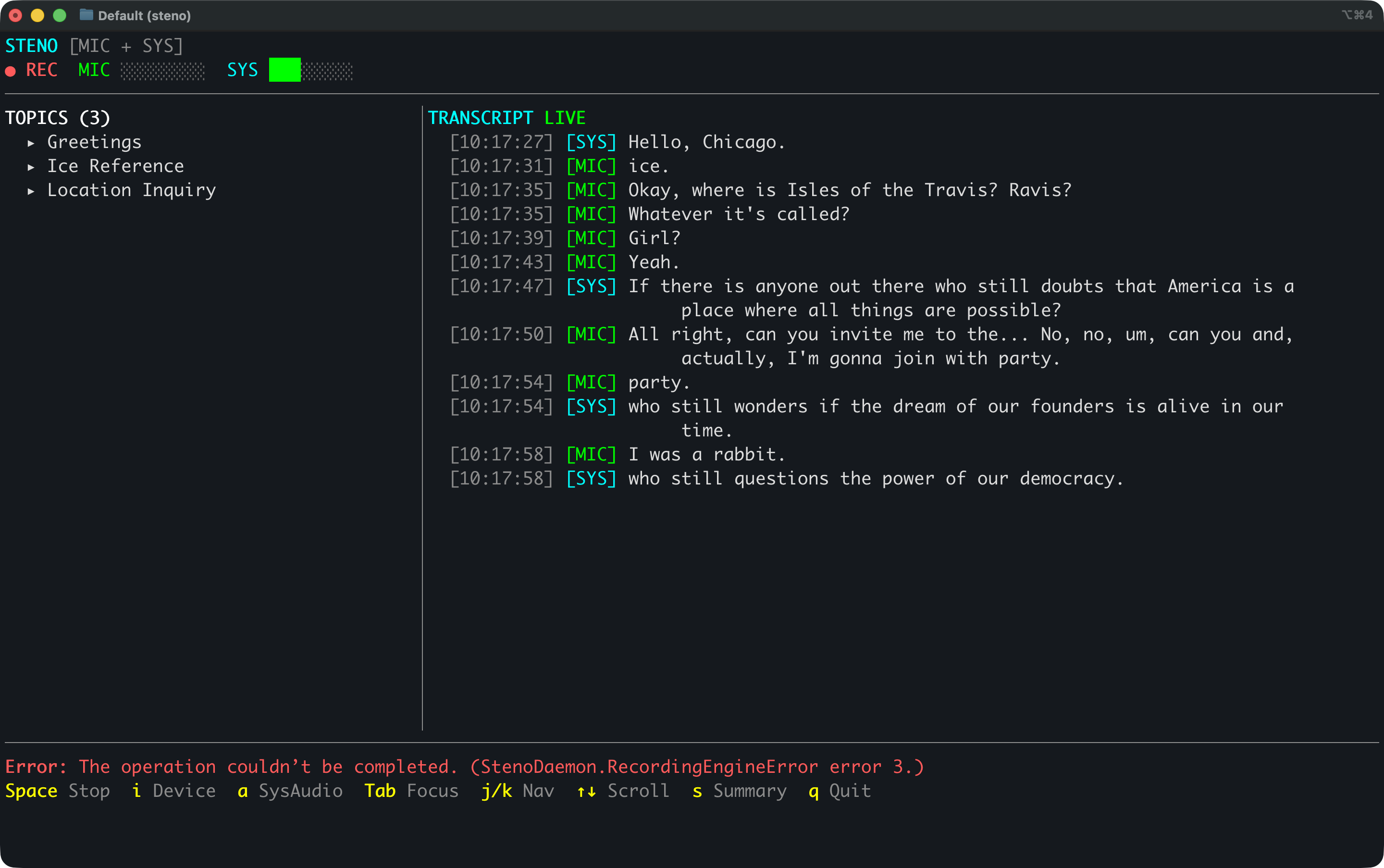
Before Steno, the way I’d capture conversations for later analysis was: manually start a recording, transcribe it after the fact, file it somewhere, then feed it into an agent later. It worked, but it was all manual and the transcripts were disconnected from everything else.
Now I fire up Steno and it captures in real time. My agents can query transcripts while they’re being recorded via MCP or direct DB queries, or after the fact, or both. I capture FaceTime conversations with friends, talk through problems on my hobby projects out loud, and all of it is immediately available to synthesize into docs, code, whatever I’m building.
Since the first post, Steno has grown into a two-process setup: a headless Swift daemon that records and transcribes continuously, and a Go terminal client that displays everything. The daemon just sits in the background for days, writing transcript segments into SQLite as they come in. No audio files piling up, just a database that keeps growing and stays queryable across sessions and timespans. I (with Claude Code) built all of it in about two weekends.
Both Sides of the Conversation
The first version only heard my microphone. That’s fine for talking to myself, but FaceTime calls and group chats need both sides. Press a and Steno starts capturing system audio too. The transcript shows [MIC] for me and [SYS] for everyone else, with separate level meters.
Getting there took some figuring out. Core Audio Taps looked like the right API — create a process tap, capture the output. But macOS TCC (Transparency, Consent, and Control) doesn’t really work with unbundled CLI tools. The binary never appeared in System Settings, no recording indicator showed up, and macOS just silently delivered empty audio buffers. We spent a couple hours debugging zeros before we understood why.
ScreenCaptureKit turned out to be the answer. It triggers the proper permission dialog, shows the orange recording indicator, and actually delivers audio. Simpler API too. Each audio source gets its own SpeechAnalyzer instance: mic at 16kHz mono, system audio converted down from 48kHz stereo.
Always Running in the Background
The original app tied the UI to audio capture, speech recognition, topic extraction, and database storage. If I closed the terminal, the recording stopped. I wanted transcription running all the time without needing a window open.
So I pulled the backend out into a headless daemon. steno-daemon handles all the heavy lifting: microphone and system audio capture, SpeechAnalyzer transcription, topic extraction via on-device LLMs, and SQLite persistence. It talks to clients over a Unix socket using NDJSON (newline-delimited JSON). I start it once and it just runs, surviving terminal restarts and happily chugging along for days.
Since there’s no audio being saved, just text segments flowing into SQLite, the database stays small and anything that can read SQLite can query it.
A Go TUI
With the backend living in its own process, the TUI became a pure display layer. I rewrote it in Go with bubbletea, which gives me Elm architecture for terminal apps: model, update, view. It connects to the daemon’s Unix socket for live events and reads topics directly from SQLite in WAL mode.
Running steno auto-starts the daemon if it isn’t already going, connects to the socket, and shows the live transcript with topics and level meters. One command and I’m up.
Once the Go TUI was solid, I deleted the old Swift one. Deleting 2,559 lines of dead code is always satisfying.
Best Language for the Job
The daemon is Swift because it has to be. SpeechAnalyzer, ScreenCaptureKit, and the audio stack are all Apple frameworks. But the TUI and MCP server are Go because Go has better terminal libraries and is just easier to work in for this kind of thing. bubbletea and lipgloss are fantastic, and pure-Go SQLite means I get a static binary with zero C dependencies.
I don’t know either language very well. Building with Claude Code means I can pick the best language for each part of the system without that being a blocker. Two languages, two processes, each doing what it’s best at.
Agents Listen Along
I added an MCP (Model Context Protocol) server so Claude Code and Claude Desktop can query the transcript database directly. Five read-only tools: search across sessions, list sessions, get session details with topics, retrieve full transcripts with time-window filtering, and a database overview.
steno           # Launch TUI (auto-starts daemon)
steno --mcp     # Run as MCP stdio server
Both modes live in a single Go binary. I added steno --mcp to my Claude Desktop config and now my agents have ears.
I use it when I’m on a FaceTime call with a friend talking through ideas for a project. I tell Claude Code this is what I’m doing and it “listens along” with the conversation. It queries Steno, pulls the relevant segments, and weaves those ideas into whatever I’m building. No notes to take, no recordings to scrub through.
Same thing when I’m working solo. I’ll talk through a problem out loud, thinking about edge cases and trade-offs. An hour later I ask Claude to turn those thoughts into code or documentation. It finds the segments, knows the context, and gets it done.
Having everything queryable across timespans is super useful. “What have I been thinking about this week?” is a real question with a real answer now.
Still Open Source
Steno is open source: github.com/jwulff/steno. Requires macOS 26 (Tahoe) and Apple Silicon.
curl -LO https://github.com/jwulff/steno/releases/latest/download/steno-darwin-arm64.tar.gz
tar xzf steno-darwin-arm64.tar.gz
mkdir -p ~/.local/bin
mv steno steno-daemon ~/.local/bin/
– John