Building a Speech-to-Text TUI with Claude Code
January 31, 2026
macOS Tahoe shipped with SpeechAnalyzer, Apple’s new on-device transcription API. It’s fast, handles long-form audio, and runs entirely locally. I spend a lot of time talking to myself, so transcription tech is interesting and useful to me. I wanted a testbed to experiment with different patterns: recording audio, transcribing it, storing it in a database for future RAG and analysis into my second brain markdown vault (more on that later). So I built Steno. It’s open source, it’s super fun, and I love it.
Why a Terminal App
TUIs are faster to build than GUIs: no layout constraints, no asset pipelines, no Xcode storyboards. Just text and boxes. With Claude Code and SwiftTUI, I had a working interface in minutes. That kind of speed makes building things genuinely fun again.
SpeechAnalyzer is 55% faster than Whisper and handles continuous transcription properly. The old SFSpeechRecognizer was designed for Siri-style dictation, and its isFinal flag rarely triggered during long recordings, forcing workarounds like stabilization timers. SpeechAnalyzer just works.
What It Does
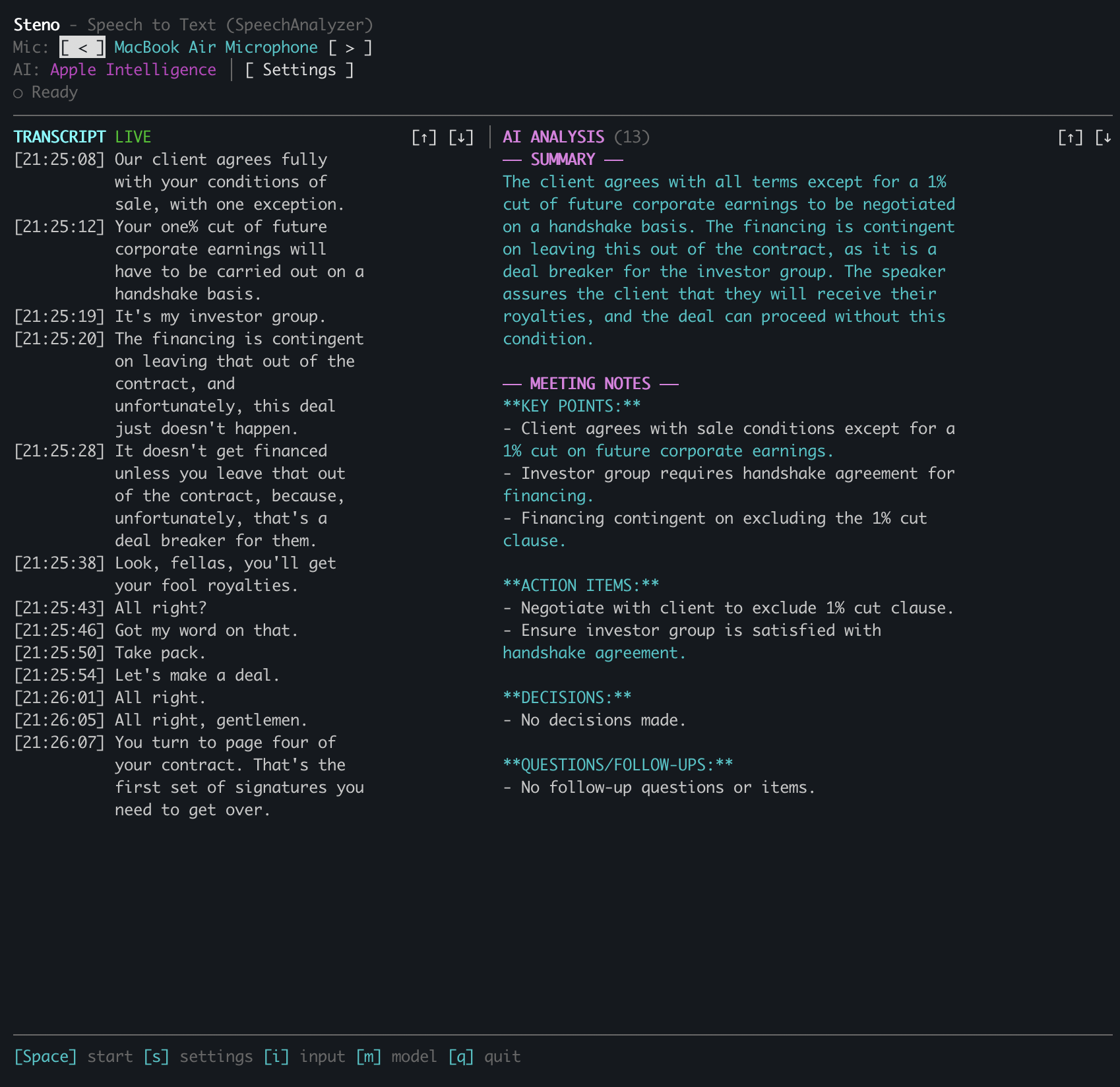
Steno runs in your terminal. You see a real-time audio level meter, the current transcript, and a status bar. Partial results appear in yellow as you speak, then turn white when finalized. Everything happens on-device.
Press space to start transcribing, again to stop. The other keys do what you’d expect: s for settings, q to quit, i to cycle inputs, m to switch models.
The AI piece is optional. If you add your Anthropic API key, Steno will summarize your transcript on demand. It fetches the current list of Claude models from the API and lets you pick one. I default to Haiku for speed.
Building with Claude Code
This is the part I love. I described what I wanted (real-time transcription in a terminal) and Claude Code helped me build it. We started with SwiftTUI for the interface, wired up AVAudioEngine for audio capture, then connected it to the SpeechAnalyzer API.
We added global keyboard shortcuts, which turned out to be tricky. SwiftTUI handles input through a first-responder system, but I wanted single-keystroke shortcuts that work regardless of focus, and SwiftTUI doesn’t expose the internals needed to intercept keystrokes before they reach the responder chain.
Claude suggested forking SwiftTUI locally. We added a static globalKeyHandlers dictionary to the Application class. Now the input handler checks for global shortcuts first:
if let handler = Application.globalKeyHandlers[char] {
    handler()
} else {
    window.firstResponder?.handleEvent(char)
}
The whole patch was about ten lines. Swift 6’s strict concurrency required marking the static dictionary as nonisolated(unsafe), but since SwiftTUI’s input handling is already single-threaded, that’s fine.
The Audio Pipeline
Getting audio from the microphone to SpeechAnalyzer required some format wrangling. Mics typically output 48kHz stereo. SpeechAnalyzer wants 16kHz mono. The AudioTapProcessor handles the conversion:
AVAudioEngine → AudioTapProcessor → AsyncStream → SpeechAnalyzer
                     ↓                                  ↓
              (48kHz → 16kHz)                   SpeechTranscriber
                                                       ↓
                                               transcriber.results
The processor is isolated from the main actor to satisfy Swift 6’s concurrency requirements. Audio callbacks can’t block on the main thread.
Try It
Steno is open source: github.com/jwulff/steno
Requirements: macOS 26 (Tahoe) or later.
# Download and unzip
curl -L https://github.com/jwulff/steno/releases/latest/download/steno-macos-arm64.zip -o steno.zip
unzip steno.zip

# Remove quarantine attribute (required for unsigned binaries)
xattr -d com.apple.quarantine steno

# Run
./steno
On first run, you’ll need to grant microphone and speech recognition permissions. The speech models download automatically if needed.
If you want AI summarization, add your Anthropic API key in the settings screen (press s).
The best part of building with Claude Code is the velocity: describe a feature, watch it appear, iterate. The forked SwiftTUI approach would have taken me hours to figure out alone, but with Claude we had working keyboard shortcuts in twenty minutes. I forgot how much I missed this feeling of just making things.
What’s Next
Next I want to play with more structured analysis and real-time feedback. Imagine something that listens and proactively researches what’s being discussed, a real-time expert deep diver for spitballing conversations. That’d be neat.
– John