<?xml version="1.0" encoding="utf-8"?><feed xmlns="http://www.w3.org/2005/Atom" ><generator uri="https://jekyllrb.com/" version="4.4.1">Jekyll</generator><link href="https://johnwulff.com/feed.xml" rel="self" type="application/atom+xml" /><link href="https://johnwulff.com/" rel="alternate" type="text/html" /><updated>2026-02-21T19:32:04+00:00</updated><id>https://johnwulff.com/feed.xml</id><title type="html">John Wulff</title><subtitle>Personal site, recipes, and writing from John Wulff.</subtitle><entry><title type="html">Dashboard Update: From Agent Framework to One Prompt, Saving $1,700/Month</title><link href="https://johnwulff.com/2026/02/21/insights-cost-refactor/" rel="alternate" type="text/html" title="Dashboard Update: From Agent Framework to One Prompt, Saving $1,700/Month" /><published>2026-02-21T00:00:00+00:00</published><updated>2026-02-21T00:00:00+00:00</updated><id>https://johnwulff.com/2026/02/21/insights-cost-refactor</id><content type="html" xml:base="https://johnwulff.com/2026/02/21/insights-cost-refactor/"><![CDATA[<p><img src="/assets/images/posts/pixoo-signage/bedrock-cost-chart.png" alt="AWS Bedrock cost chart showing a cliff on February 11" class="hero" /></p>

<p><em>This is Part 5 in a series about a LED diabetes dashboard I built for my daughter Abigail. It shows her glucose, insulin, and weather on a 64x64 display, with an AI agent that offers short supportive observations. <a href="/2026/01/18/pixoo-signage/">Part 1</a> covers building it. <a href="/2026/01/27/pixoo-signage-insulin-tracking/">Part 2</a> adds insulin tracking. <a href="/2026/02/02/pixoo-signage-insights-agent/">Part 3</a> introduces the AI insights agent. <a href="/2026/02/03/insights-refinements/">Part 4</a> refines it after a stressful night.</em></p>

<p>I used an agent framework where a single prompt would have done the job. The overkill was on track to cost me $1,700/month.</p>

<p>I built the insights agent using <a href="https://aws.amazon.com/bedrock/agents/">AWS Bedrock Agents</a>. Bedrock Agents is a framework for building autonomous AI workflows where the model decides which tools to call, in what order, based on a conversation. It’s great for complex, fluid tasks where the reasoning path isn’t known in advance.</p>

<p>My task was not complex or fluid. I needed to take diabetes data, inject it into a prompt, and get a 30-character insight for an LED display. The same data, the same prompt structure, every time. A one-shot inference call.</p>

<p>Instead, I built a multi-turn agent with four action groups, OpenAPI schemas, IAM roles for each tool, and agent alias versioning. The agent would decide to call <code class="language-plaintext highlighter-rouge">getRecentGlucose</code>, then <code class="language-plaintext highlighter-rouge">getDailyStats</code>, then <code class="language-plaintext highlighter-rouge">getRecentTreatments</code>, then <code class="language-plaintext highlighter-rouge">getInsightHistory</code>, then <code class="language-plaintext highlighter-rouge">storeInsight</code>. Each roundtrip resent the full prompt and accumulated context. Five calls, each one bigger than the last.</p>

<h2 id="one-prompt-instead-of-five">One Prompt Instead of Five</h2>

<p>The fix was simple. Instead of letting the agent orchestrate its own data gathering, each Lambda pre-fetches the data it needs from DynamoDB, formats everything into a single prompt, and calls Claude once via <code class="language-plaintext highlighter-rouge">InvokeModel</code>. One request, one response.</p>

<p>I (with Claude Code) replaced the entire Bedrock Agent framework with a shared <a href="https://github.com/jwulff/signage/blob/185067a/packages/functions/src/diabetes/analysis/invoke-model.ts">invoke-model.ts</a> utility of about 80 lines. Deleting 2,559 lines of code is always satisfying.</p>

<p>Bedrock Agents are super cool. I’ll definitely build more agents on this service where I have more ambiguous tasks. But for a predictable prompt/response cycle where I know exactly what data the model needs, one-shot inference worked way better. Faster, cheaper, and about 80 lines of code instead of 2,559.</p>

<p>Post-deploy results after a full day of production data: zero errors, 32 insights generated, quality unchanged. Cost: roughly $1/day, down from $58/day.</p>

<h2 id="rate-limiting">Rate Limiting</h2>

<p>The architecture wasn’t the only inefficiency. The agent ran on every CGM reading: 288 per day, one every 5 minutes. Most invocations replaced a still-relevant insight minutes later.</p>

<p>I replaced the 5-minute debounce with smart triggers that only generate a new insight when something actually changes: enough time has passed, glucose moves significantly, or glucose crosses a zone boundary. This cut invocations from 288/day to about 36.</p>

<p>I also tried switching from Claude Sonnet 4.5 to Haiku 4.5, figuring short LED insights didn’t need the bigger model. That didn’t go well, at all. Haiku hallucinated constantly. “Steady drop since 8pm” when the data showed 25 minutes of decline. “Great overnight!” when she’d been high for hours. It would confidently describe glucose patterns that weren’t in the data at all. For anything involving medical data, even short observations, grounding matters more than speed. I switched back to Sonnet the same night.</p>

<p>The nice thing: with rate limiting cutting volume by 87%, Sonnet at 36 invocations/day cost less than Haiku at 288/day. I didn’t have to compromise on quality to fix the cost problem.</p>

<table>
  <thead>
    <tr>
      <th>Configuration</th>
      <th>Invocations/day</th>
      <th>Cost/day</th>
      <th>Cost/month</th>
    </tr>
  </thead>
  <tbody>
    <tr>
      <td>Bedrock Agent + 5min debounce</td>
      <td>~288</td>
      <td>~$58</td>
      <td>~$1,751</td>
    </tr>
    <tr>
      <td>Bedrock Agent + rate limiting</td>
      <td>~36</td>
      <td>~$7</td>
      <td>~$210</td>
    </tr>
    <tr>
      <td>One-shot inference + rate limiting</td>
      <td>~36</td>
      <td>~$1</td>
      <td>~$28</td>
    </tr>
  </tbody>
</table>

<h2 id="quality-fixes">Quality Fixes</h2>

<p>I fixed several quality issues along the way.</p>

<p><strong>Repetition.</strong> I analyzed 2,477 insights over a week and found a 54% repeat rate. “Best day this week!” appeared 260 times. The agent was copying example phrases from its prompt verbatim. I removed the examples, banned generic praise, and added a storage-layer dedup that rejects exact duplicates within a 6-hour window.</p>

<p><strong>Timezone.</strong> Lambda runs in us-east-1, and the agent was using UTC hours from <code class="language-plaintext highlighter-rouge">Date.getHours()</code>. Noon Pacific is 8 PM UTC. The agent would say “evening going well!” at lunchtime. Fixed with <code class="language-plaintext highlighter-rouge">Intl.DateTimeFormat</code> using <code class="language-plaintext highlighter-rouge">America/Los_Angeles</code>.</p>

<h2 id="what-it-looks-like-now">What It Looks Like Now</h2>

<p>The display looks the same. Same 30-character insights in green, yellow, red, and rainbow. Same supportive voice noticing patterns. Abigail doesn’t know anything changed, which is exactly right.</p>

<p>The original dashboard ran for $4/month. The insights agent blew that up to $1,700/month. Now it’s about $30/month total: the original infrastructure plus one-shot inference at a sensible rate. The codebase is 2,559 lines lighter, the insights are less repetitive, and the agent knows what time zone it’s in.</p>

<p>Still open source on <a href="https://github.com/jwulff/signage">GitHub</a>.</p>

<p>– John</p>]]></content><author><name></name></author><summary type="html"><![CDATA[Replacing AWS Bedrock Agents with one-shot inference for the diabetes insights display. Same quality, 98% cheaper, 2,559 fewer lines of code.]]></summary></entry><entry><title type="html">Dashboard Update: Teaching the Agent to Think Like We Do</title><link href="https://johnwulff.com/2026/02/03/insights-refinements/" rel="alternate" type="text/html" title="Dashboard Update: Teaching the Agent to Think Like We Do" /><published>2026-02-03T00:00:00+00:00</published><updated>2026-02-03T00:00:00+00:00</updated><id>https://johnwulff.com/2026/02/03/insights-refinements</id><content type="html" xml:base="https://johnwulff.com/2026/02/03/insights-refinements/"><![CDATA[<p><em>This is Part 4. <a href="/2026/01/18/pixoo-signage/">Part 1</a> covers building the dashboard. <a href="/2026/01/27/pixoo-signage-insulin-tracking/">Part 2</a> adds insulin tracking. <a href="/2026/02/02/pixoo-signage-insights-agent/">Part 3</a> introduces the AI insights agent.</em></p>

<p><img src="/assets/images/posts/pixoo-signage/insight-landing.png" alt="The display showing &quot;SMOOTH LANDING!&quot; in green" class="hero" /></p>

<p>Yesterday I wrote about adding an AI insights agent to the diabetes dashboard. Getting it to sound human was the hard part. Since then, I’ve been teaching it to think more like we do.</p>

<h2 id="tonight">Tonight</h2>

<p>Abigail broke routine after school. A new dance class and a goldfish snack were all it took to spike high. It happens. We loaded her up with insulin all evening to bring her back down. After she went to bed, it became clear we’d overshot the correction. Also happens. Normally not a huge deal, we just had to wake her up and give her some sugar.</p>

<p>The first wakeup went fine. She took the juice, we waited. But it wasn’t enough. She kept dropping.</p>

<p>By the second wakeup she was low enough to feel it. Disoriented, uncooperative, and <em>very</em> unhappy to be woken up. This is when it gets scary. We had to hold her down and push honey over her screams. Sometimes it’s not gentle coaxing and juice boxes. Sometimes it’s restraining your screaming kid because the alternative is worse.</p>

<p>Eventually the sugar kicked in. She rebounded hard, then leveled off. Actually stable.</p>

<p>After she started to come up, the display said “SMOOTH LANDING!” Only it wasn’t. Not yet. She was barely out of the woods and climbing fast. The insight was wrong, the opposite of useful after a stressful situation.</p>

<h2 id="the-gap">The Gap</h2>

<p>The obvious problem: no intelligence about rate of change. The insights were over-indexed on the current value, not the trend.</p>

<p>After treating a low with sugar, glucose often spikes. Easy to overcorrect. A rise from 78 to 105 in a few readings isn’t a “smooth landing.” It’s a rebound that might overshoot high. The agent was celebrating these rebounds. “Coming up nicely!” when the trajectory suggested she’d blow past 200.</p>

<p>The same problem works in reverse. A glucose reading of 115 and dropping doesn’t tell you much by itself. But 115 dropping <em>and slowing down</em> is good news. That’s a landing. 115 dropping <em>and speeding up</em> is a problem. Same number, opposite actions. The agent would see a drop from 150 to 130 to 120 to 115 and say “Still dropping, eat!” That’s false urgency. The drop is decelerating. She’s leveling off.</p>

<h2 id="what-stable-actually-means">What “Stable” Actually Means</h2>

<p><img src="/assets/images/posts/pixoo-signage/insight-stable.png" alt="The display showing &quot;FINALLY STABLE AGAIN!&quot; in green" class="float-left" /></p>

<p>A subtler problem: the agent didn’t know what stable really means.</p>

<p>It was saying “leveling off nicely!” when glucose was still drifting toward a low. 80 and dropping slowly isn’t stable. It’s still dropping. But the agent saw the number in range and celebrated.</p>

<p>This matters most near the edges. At 78 and still drifting down, even slowly, “leveling off” creates false confidence. Stable means truly flat readings: two to three consecutive readings within ±3 mg/dL. That’s when “FINALLY STABLE AGAIN!” actually means something.</p>

<h2 id="how-the-refinements-happen">How the Refinements Happen</h2>

<p>So I fired up Claude Code and together we refined the <a href="https://github.com/jwulff/signage/blob/45fdd8c/packages/functions/src/diabetes/analysis/stream-trigger.ts">agent prompt</a> to take all of this into account.</p>

<p>The cycle: I see a situation, note what the insight should have been, and Claude iterates on the prompt.</p>

<p>The agent says “Smooth landing!” during a steep rebound. Should have been: “Coming up fast, watch it.” Claude adds guidance about post-low spikes and overshoot risk.</p>

<p>The agent says “Leveling off!” while still drifting down. Should have been: “Still drifting, more?” Claude adds guidance that stable means flat for 2-3 readings.</p>

<p>The agent creates false urgency during a decelerating drop. Should have been: “Leveling off nicely!” Claude adds guidance to factor in acceleration, not just direction.</p>

<p>It’s iterative. The prompt grows more specific with each edge case, with explicit FORBIDDEN examples for each failure mode.</p>

<h2 id="capturing-the-reasoning">Capturing the Reasoning</h2>

<p>To make this cycle easier, I have the agent record its thinking with each insight so I can review it later and iterate accordingly.</p>

<p>Bedrock Agents don’t enforce required parameters, so even with emphatic prompts the agent wasn’t passing reasoning through the tool. But it does explain itself in its conversational response. So I parse that out and store it alongside the insight.</p>

<div class="language-plaintext highlighter-rouge"><div class="highlight"><pre class="highlight"><code>Insight: "[green]Leveling off nicely![/]"
Reasoning: Glucose dropped from high→less high→almost normal over
the past hour, but the rate is decelerating. Each reading shows a
smaller drop than the last. This is a landing pattern, not a
continuing fall. Celebrating the deceleration, not warning about
the direction.
</code></pre></div></div>

<div class="language-plaintext highlighter-rouge"><div class="highlight"><pre class="highlight"><code>Insight: "[yellow]Coming up fast![/]"
Reasoning: Post-low rebound in progress. Glucose was 72 twenty
minutes ago, now 118 and still climbing steeply. This +46 rise
suggests overcorrection from treatment. Not celebrating yet
because trajectory points toward overshoot into high territory.
</code></pre></div></div>

<div class="language-plaintext highlighter-rouge"><div class="highlight"><pre class="highlight"><code>Insight: "[yellow]Still drifting, more?[/]"
Reasoning: Glucose at 81, down from 88 and 94. Still dropping
about 6-7 per reading. Not flat yet. Near the low threshold so
caution warranted. Suggesting additional carbs rather than
celebrating stability that hasn't arrived.
</code></pre></div></div>

<p>Now I can review not just what the agent said, but why it said it. Useful for debugging and for understanding when the logic needs refinement.</p>

<h2 id="the-result">The Result</h2>

<p><img src="/assets/images/posts/pixoo-signage/insight-back-steady.png" alt="The display showing &quot;BACK STEADY AFTER THAT!&quot; in green" class="float-right" /></p>

<p>“BACK STEADY AFTER THAT!” acknowledges the journey. The agent saw the red spike in the chart, watched the recovery, and waited for truly flat readings before celebrating. It won’t confuse a rebound for a landing. It won’t panic during a decelerating drop. And it won’t claim stable when the drop keeps going slowly, like tonight.</p>

<p>That’s what I wanted: an agent that thinks about the situation the way we do.</p>

<p>I sure wish I could get real-time insulin data. The pump knows how much insulin is “on board” in these situations, which would help predict where things are headed. But Glooko syncs are delayed several hours. Something I’ll add the minute I can get my hands on real-time pump data. (Please please please give me API access to this, Insulet!)</p>

<p>Still open source on <a href="https://github.com/jwulff/signage">GitHub</a>.</p>

<p><em><a href="/2026/02/21/insights-cost-refactor/">Part 5</a> replaces the agent framework with one-shot inference to save $1,700/month.</em></p>

<p>– John</p>]]></content><author><name></name></author><summary type="html"><![CDATA[Refining the insights agent with rate of change intelligence, post-low rebound awareness, and a real definition of stable.]]></summary></entry><entry><title type="html">Dashboard Update: An AI Friend Who Watches the Numbers</title><link href="https://johnwulff.com/2026/02/02/pixoo-signage-insights-agent/" rel="alternate" type="text/html" title="Dashboard Update: An AI Friend Who Watches the Numbers" /><published>2026-02-02T00:00:00+00:00</published><updated>2026-02-02T00:00:00+00:00</updated><id>https://johnwulff.com/2026/02/02/pixoo-signage-insights-agent</id><content type="html" xml:base="https://johnwulff.com/2026/02/02/pixoo-signage-insights-agent/"><![CDATA[<p><em>This is Part 3. <a href="/2026/01/18/pixoo-signage/">Part 1</a> covers building the dashboard. <a href="/2026/01/27/pixoo-signage-insulin-tracking/">Part 2</a> adds insulin tracking.</em></p>

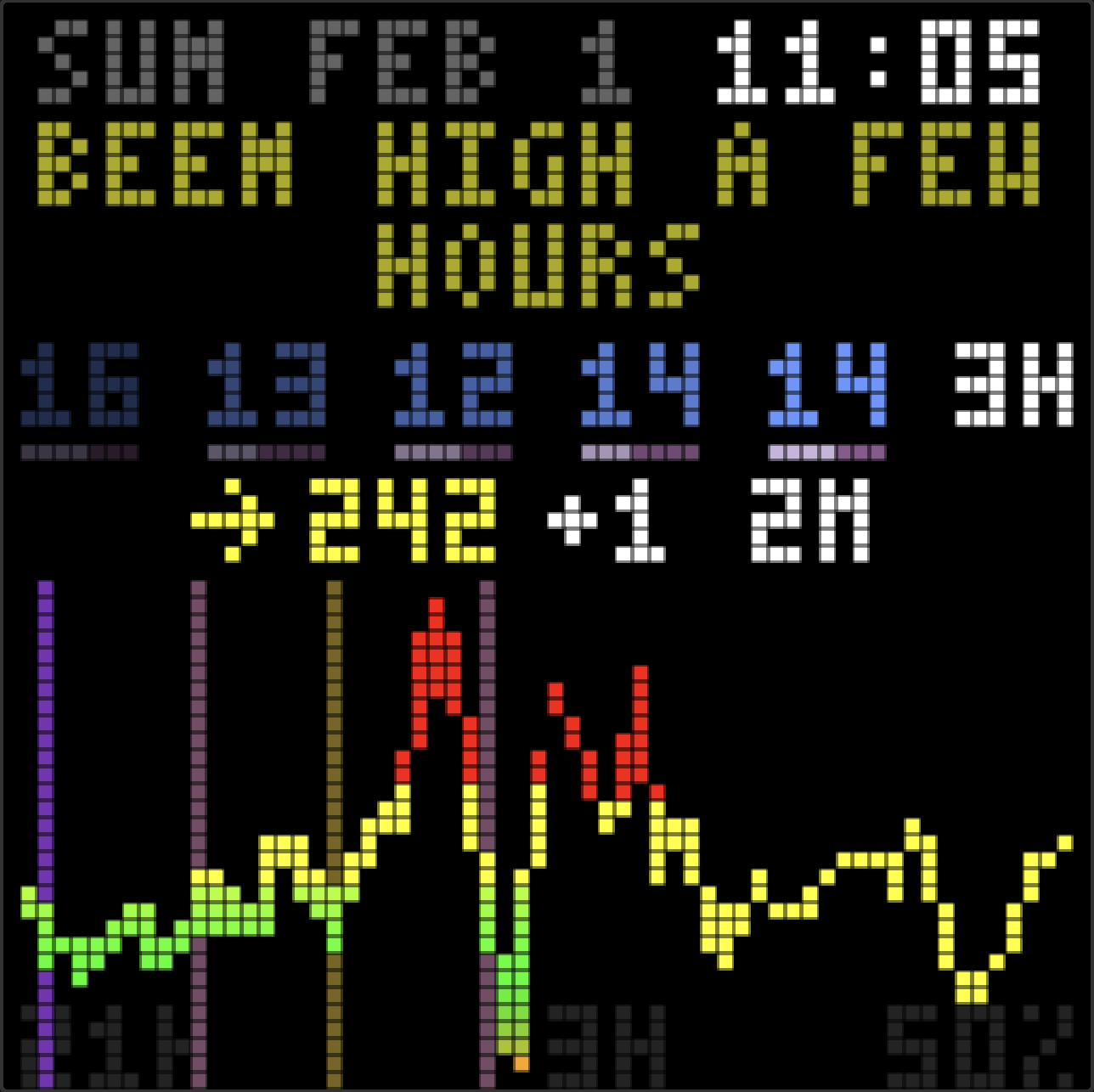
<p><img src="/assets/images/posts/pixoo-signage/insight-display.png" alt="The display showing &quot;BEEN HIGH A FEW HOURS&quot; insight" class="hero" /></p>

<p>The dashboard has a new feature: an AI that watches the glucose and insulin data, then offers short observations on the display. Not commands or clinical alerts, just a friendly voice that notices patterns we might miss.</p>

<h2 id="why-an-insights-agent">Why an Insights Agent</h2>

<p>Managing T1D means interpreting numbers constantly. Is this a trend or a blip? Did lunch hit harder than expected? Are overnight lows becoming a pattern? We do this interpretation all the time, but we can’t watch every moment (we try though).</p>

<p>I wanted a second set of eyes and some validation. Something that could look at the last few hours (glucose, insulin, carbs) and surface one helpful observation. Not a diagnosis or medical advice, just a nudge, “steady all morning, nice!” or “rising after lunch, pre-bolus next time?”</p>

<h2 id="what-it-feels-like">What It Feels Like</h2>

<p>The display now has a voice. Glancing at it in the morning: “great overnight!” in green, a small celebration. After a rough lunch: “been high a while, bolus?” as a gentle check-in. Three days of tight control: “3 days in range!” cycling through rainbow colors.</p>

<p>It’s not a medical device. It’s not trying to be a doctor. It’s more like a friend who pays attention. Another person on the team that notices the patterns. A supportive cheer for the wins and gentle questions about the struggles.</p>

<h2 id="the-hard-part-making-it-human">The Hard Part: Making It Human</h2>

<p>Thanks to <a href="https://www.anthropic.com/claude-code">Claude Code</a>, getting the agent working was easy. It took most of the day, chugging away with me stopping to give feedback every 30 minutes or so, but it didn’t take much input from me to get going. Getting it to sound human took some tweaking and is where I felt my value to the project.</p>

<p>Claude’s first attempt yielded abbreviations. “Hi 4h avg230 now241”. Readable if you studied it, but robotic. It was building a telegraph, not a friend.</p>

<p>Second attempt: natural language with exact numbers. “Glucose 241, been high 3 hours, consider bolus.” Better, but clinical. Felt like a medical device, not a companion.</p>

<p>I kept giving feedback: more ranges, more questions, some color, gentle. Instead of “241,” say “over 200.” Instead of “need bolus,” ask “bolus?” A caring friend suggests, doesn’t command. The difference between “you should eat” and “hungry?” is everything when things are already suboptimal.</p>

<p><a href="https://github.com/jwulff/signage/blob/7494ca8/packages/functions/src/diabetes/analysis/stream-trigger.ts#L90-L128">The final prompt</a> required explicit FORBIDDEN examples. I literally had to tell Claude that “Hi 4h avg230” was “robotic garbage.” Subtle guidance wasn’t enough but we got there!</p>

<h2 id="colors-for-emotion">Colors for Emotion</h2>

<p>Plain white text couldn’t convey tone. A celebration looked the same as a warning.</p>

<p>I added <a href="https://github.com/jwulff/signage/blob/7494ca8/packages/functions/src/rendering/insight-renderer.ts#L54-L98">color markup</a> the agent can use. Green for celebrations and wins. Yellow for caution when running high. Red for urgent situations like lows. And rainbow for big wins, cycling through colors character by character.</p>

<p>“steady all day!” in green hits different than plain white text. The display becomes expressive.</p>

<p>Colors are muted, about two-thirds brightness, so they don’t compete with the glucose reading. The number is still the star. The insight is a whisper, not a shout.</p>

<h2 id="the-constraints">The Constraints</h2>

<p>The LED display has room for two lines of about 15 characters each. 30 characters total. Every word counts.</p>

<p>The agent often generated 40, 50, even 80 characters despite the prompt. I added a retry loop: if the insight is too long, ask the agent to shorten it. Same session, same context, just “that was 45 chars, please make it 30.” Works most of the time. Force-truncate as a fallback.</p>

<p>Two lines also need to look balanced. “BEEN HIGH A FEW” + “HOURS” looks awkward. “BEEN HIGH A” + “FEW HOURS” looks intentional. The compositor now splits short text near the middle.</p>

<h2 id="how-it-works">How It Works</h2>

<p>I used this as an opportunity to learn <a href="https://aws.amazon.com/bedrock/agents/">AWS Bedrock Agents</a>, something we’re also embracing at work. The agent runs <a href="https://aws.amazon.com/bedrock/claude/">Claude Sonnet 4.5</a> with access to the diabetes data in DynamoDB. It can query glucose readings, insulin doses, carb entries, and computed stats like <a href="https://diabetes.org/about-diabetes/devices-technology/cgm-time-in-range">Time in Range</a>. Then it stores a short insight for the display.</p>

<p><a href="https://github.com/jwulff/signage/blob/7494ca8/packages/functions/src/diabetes/analysis/stream-trigger.ts#L43-L69">DynamoDB Streams</a> trigger the agent when new data arrives. Event-driven, not hourly cron. When Abigail’s CGM sends a new reading or Glooko syncs pump data, the agent runs within seconds.</p>

<h2 id="what-it-costs">What It Costs</h2>

<p>The insights agent changed the economics. The original dashboard ran for about $4/month. With the agent analyzing every CGM reading, costs jumped significantly.</p>

<p>CGM readings arrive every 5 minutes, 288 times per day. Each agent invocation uses Claude Sonnet 4.5 on Bedrock at $3 per million input tokens and $15 per million output tokens. With the prompt, data queries, and responses, that adds up to roughly $40-50/month for the agent alone.</p>

<p>Worth it for us. The supportive nudges and pattern recognition add real value to daily diabetes management. But it’s no longer a $4/month hobby project.</p>

<h2 id="whats-next">What’s Next</h2>

<p>That 10x cost jump needs work. Right now the agent runs on every CGM reading, even at 3am when we’re asleep and the numbers are steady. Smarter would be: only generate new insights when glucose moves significantly, or when it’s been a while, or when we’re probably awake. No need to pay Claude to tell a sleeping house that everything’s fine. (Though I appreciate the sentiment.)</p>

<p>I’ll keep tweaking the prompt too. The voice is close but not perfect. More feedback, more iterations.</p>

<p>Stepping back from the display itself, there’s a bigger opportunity here. The agent already has access to weeks of glucose, insulin, and carb data. Why stop at 30-character insights on an LED?</p>

<p>Morning email reports summarizing how overnight went. Weekly trends with suggestions to try. Coaching on carb ratios and bolus timing. “You’ve been running high after breakfast three days in a row. Want to try a 10% increase in your morning ratio?” The data is there. The reasoning is there. The interface could be anything.</p>

<p>For more complex workflows, AWS has <a href="https://aws.amazon.com/bedrock/agentcore/">AgentCore</a>, a newer framework for building multi-agent systems. Could be fun to explore for coordinating analysis, recommendations, and delivery across different channels.</p>

<p>I’m excited to keep building. AI tools for diabetes management feel like exactly the kind of thing I want to spend time on. Personal, useful, iterative. A fun excuse to keep learning and a real way to help my family.</p>

<p>Still open source on <a href="https://github.com/jwulff/signage">GitHub</a>.</p>

<p><em><a href="/2026/02/03/insights-refinements/">Part 4</a> refines the insights after a stressful night.</em></p>

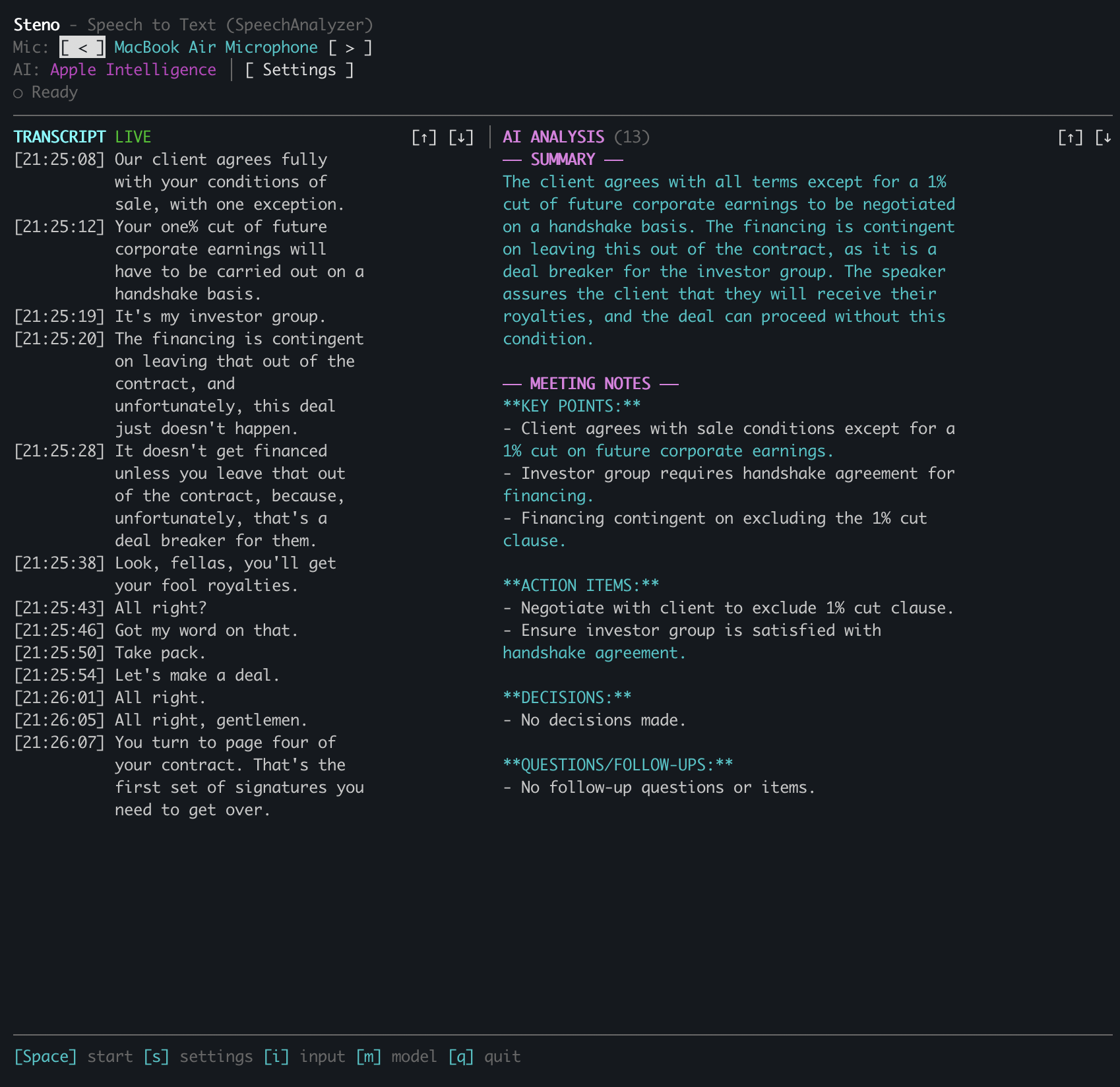
<p>– John</p>]]></content><author><name></name></author><summary type="html"><![CDATA[Adding a Bedrock-powered insights agent to the family glucose dashboard. Supportive observations, not robotic commands.]]></summary></entry><entry><title type="html">Building a Speech-to-Text TUI with Claude Code</title><link href="https://johnwulff.com/2026/01/31/steno-speech-to-text-tui/" rel="alternate" type="text/html" title="Building a Speech-to-Text TUI with Claude Code" /><published>2026-01-31T00:00:00+00:00</published><updated>2026-01-31T00:00:00+00:00</updated><id>https://johnwulff.com/2026/01/31/steno-speech-to-text-tui</id><content type="html" xml:base="https://johnwulff.com/2026/01/31/steno-speech-to-text-tui/"><![CDATA[<p>macOS Tahoe shipped with <a href="https://developer.apple.com/documentation/speech/speechanalyzer">SpeechAnalyzer</a>, Apple’s new on-device transcription API. It’s fast, handles long-form audio, and runs entirely locally. I spend a lot of time <a href="/2026/01/11/voice-memos-to-second-brain/">talking to myself</a>, so transcription tech is interesting and useful to me. I wanted a testbed to experiment with different patterns: recording audio, transcribing it, storing it in a database for future RAG and analysis into my second brain markdown vault (more on that later). So I built <a href="https://github.com/jwulff/steno">Steno</a>. It’s open source, it’s super fun, and I love it.</p>

<p><img src="/assets/images/posts/steno-speech-to-text-tui/steno-tui.png" alt="Steno TUI showing live transcription and AI analysis" class="full-width" /></p>

<h2 id="why-a-terminal-app">Why a Terminal App</h2>

<p>TUIs are faster to build than GUIs: no layout constraints, no asset pipelines, no Xcode storyboards. Just text and boxes. With Claude Code and SwiftTUI, I had a working interface in minutes. That kind of speed makes building things genuinely fun again.</p>

<p>SpeechAnalyzer is 55% faster than Whisper and handles continuous transcription properly. The old SFSpeechRecognizer was designed for Siri-style dictation, and its <code class="language-plaintext highlighter-rouge">isFinal</code> flag rarely triggered during long recordings, forcing workarounds like stabilization timers. SpeechAnalyzer just works.</p>

<h2 id="what-it-does">What It Does</h2>

<p>Steno runs in your terminal. You see a real-time audio level meter, the current transcript, and a status bar. Partial results appear in yellow as you speak, then turn white when finalized. Everything happens on-device.</p>

<p>Press space to start transcribing, again to stop. The other keys do what you’d expect: <code class="language-plaintext highlighter-rouge">s</code> for settings, <code class="language-plaintext highlighter-rouge">q</code> to quit, <code class="language-plaintext highlighter-rouge">i</code> to cycle inputs, <code class="language-plaintext highlighter-rouge">m</code> to switch models.</p>

<p>The AI piece is optional. If you add your Anthropic API key, Steno will summarize your transcript on demand. It fetches the current list of Claude models from the API and lets you pick one. I default to Haiku for speed.</p>

<h2 id="building-with-claude-code">Building with Claude Code</h2>

<p>This is the part I love. I described what I wanted (real-time transcription in a terminal) and Claude Code helped me build it. We started with SwiftTUI for the interface, wired up AVAudioEngine for audio capture, then connected it to the SpeechAnalyzer API.</p>

<p>We added global keyboard shortcuts, which turned out to be tricky. SwiftTUI handles input through a first-responder system, but I wanted single-keystroke shortcuts that work regardless of focus, and SwiftTUI doesn’t expose the internals needed to intercept keystrokes before they reach the responder chain.</p>

<p>Claude suggested forking SwiftTUI locally. We added a static <code class="language-plaintext highlighter-rouge">globalKeyHandlers</code> dictionary to the Application class. Now the input handler checks for global shortcuts first:</p>

<div class="language-swift highlighter-rouge"><div class="highlight"><pre class="highlight"><code><span class="k">if</span> <span class="k">let</span> <span class="nv">handler</span> <span class="o">=</span> <span class="kt">Application</span><span class="o">.</span><span class="n">globalKeyHandlers</span><span class="p">[</span><span class="n">char</span><span class="p">]</span> <span class="p">{</span>
    <span class="nf">handler</span><span class="p">()</span>
<span class="p">}</span> <span class="k">else</span> <span class="p">{</span>
    <span class="n">window</span><span class="o">.</span><span class="n">firstResponder</span><span class="p">?</span><span class="o">.</span><span class="nf">handleEvent</span><span class="p">(</span><span class="n">char</span><span class="p">)</span>
<span class="p">}</span>
</code></pre></div></div>

<p>The whole patch was about ten lines. Swift 6’s strict concurrency required marking the static dictionary as <code class="language-plaintext highlighter-rouge">nonisolated(unsafe)</code>, but since SwiftTUI’s input handling is already single-threaded, that’s fine.</p>

<h2 id="the-audio-pipeline">The Audio Pipeline</h2>

<p>Getting audio from the microphone to SpeechAnalyzer required some format wrangling. Mics typically output 48kHz stereo. SpeechAnalyzer wants 16kHz mono. The AudioTapProcessor handles the conversion:</p>

<div class="language-plaintext highlighter-rouge"><div class="highlight"><pre class="highlight"><code>AVAudioEngine → AudioTapProcessor → AsyncStream → SpeechAnalyzer
                     ↓                                  ↓
              (48kHz → 16kHz)                   SpeechTranscriber
                                                       ↓
                                               transcriber.results
</code></pre></div></div>

<p>The processor is isolated from the main actor to satisfy Swift 6’s concurrency requirements. Audio callbacks can’t block on the main thread.</p>

<h2 id="try-it">Try It</h2>

<p>Steno is open source: <a href="https://github.com/jwulff/steno">github.com/jwulff/steno</a></p>

<p>Requirements: macOS 26 (Tahoe) or later.</p>

<div class="language-bash highlighter-rouge"><div class="highlight"><pre class="highlight"><code><span class="c"># Download and unzip</span>
curl <span class="nt">-L</span> https://github.com/jwulff/steno/releases/latest/download/steno-macos-arm64.zip <span class="nt">-o</span> steno.zip
unzip steno.zip

<span class="c"># Remove quarantine attribute (required for unsigned binaries)</span>
xattr <span class="nt">-d</span> com.apple.quarantine steno

<span class="c"># Run</span>
./steno
</code></pre></div></div>

<p>On first run, you’ll need to grant microphone and speech recognition permissions. The speech models download automatically if needed.</p>

<p>If you want AI summarization, add your Anthropic API key in the settings screen (press <code class="language-plaintext highlighter-rouge">s</code>).</p>

<p>The best part of building with Claude Code is the velocity: describe a feature, watch it appear, iterate. The forked SwiftTUI approach would have taken me hours to figure out alone, but with Claude we had working keyboard shortcuts in twenty minutes. I forgot how much I missed this feeling of just making things.</p>

<h2 id="whats-next">What’s Next</h2>

<p>Next I want to play with more structured analysis and real-time feedback. Imagine something that listens and proactively researches what’s being discussed, a real-time expert deep diver for spitballing conversations. That’d be neat.</p>

<p>– John</p>]]></content><author><name></name></author><summary type="html"><![CDATA[A terminal app for real-time transcription using macOS 26's new SpeechAnalyzer API.]]></summary></entry><entry><title type="html">Dashboard Update: Insulin Tracking and Pump Integration</title><link href="https://johnwulff.com/2026/01/27/pixoo-signage-insulin-tracking/" rel="alternate" type="text/html" title="Dashboard Update: Insulin Tracking and Pump Integration" /><published>2026-01-27T00:00:00+00:00</published><updated>2026-01-27T00:00:00+00:00</updated><id>https://johnwulff.com/2026/01/27/pixoo-signage-insulin-tracking</id><content type="html" xml:base="https://johnwulff.com/2026/01/27/pixoo-signage-insulin-tracking/"><![CDATA[<p><em>This is Part 2. <a href="/2026/01/18/pixoo-signage/">Part 1</a> covers building the dashboard from scratch.</em></p>

<p><img src="/assets/images/posts/pixoo-signage/signage-insulin-display.png" alt="The updated dashboard showing insulin tracking" class="hero" /></p>

<p>The family dashboard got smarter. It now shows insulin delivery patterns alongside glucose readings. Five days of insulin totals, bolus vs basal breakdown, and integration with Abigail’s insulin pump through Glooko.</p>

<p>Since building the dashboard, I’ve been iterating on the display. The glucose sparkline was useful, but diabetes management is about more than glucose. Insulin timing and dosing matter just as much. Could I get pump data onto the display too? Yes!</p>

<h2 id="getting-pump-data">Getting Pump Data</h2>

<p>Dexcom handles glucose. But insulin comes from a different system entirely. Abigail uses an Insulet Omnipod 5 insulin pump, which syncs to an app called Glooko. Glooko aggregates data from the pump: bolus doses, basal delivery, carb entries. All the treatment data that helps explain why glucose goes up or down.</p>

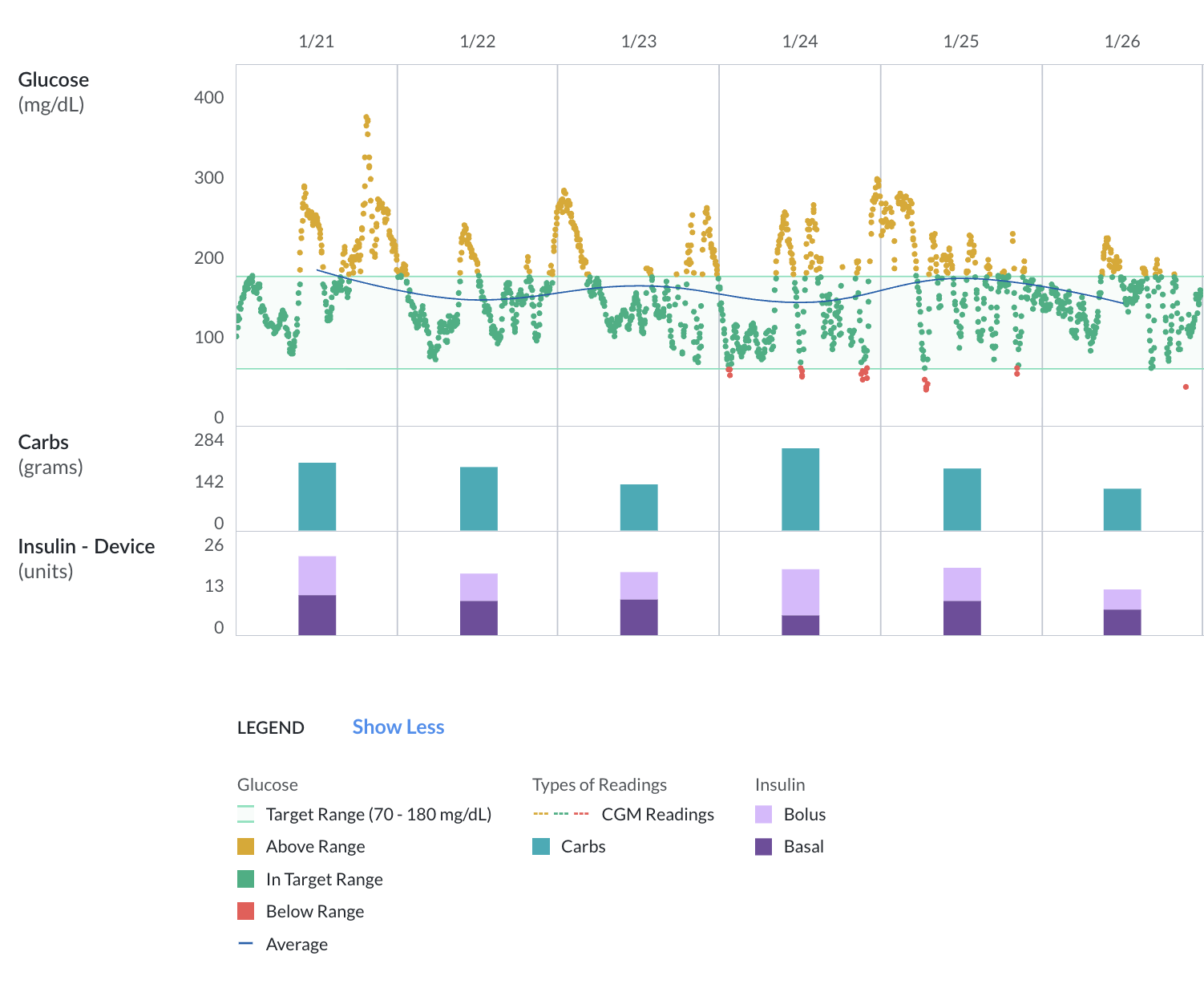
<p><img src="/assets/images/posts/pixoo-signage/glooko-dashboard.png" alt="Glooko dashboard showing glucose, carbs, and insulin data" class="full-width" />
<em>Glooko’s web dashboard: glucose readings up top, carbs in the middle, insulin at the bottom with bolus (light purple) and basal (dark purple) stacked.</em></p>

<p>Insulet doesn’t have a public API, but they do share data with Glooko—which doesn’t have a public API either, but does have a CSV export in their web UI. No API? No problem. I built a web scraper.</p>

<p>A Lambda function runs Puppeteer with headless Chrome. It logs into Glooko, navigates to the export page, downloads a CSV archive, and parses the treatment data. The whole thing runs hourly on a schedule. Puppeteer in Lambda requires some gymnastics (<code class="language-plaintext highlighter-rouge">@sparticuz/chromium</code> for the binary, 1GB of memory for Chrome), but it works reliably.</p>

<p>The scraper extracts everything: bolus doses, basal rates, carb entries, even alarm events from the pump. All of it goes into DynamoDB with idempotent writes, building a historical diabetes database over time. Same data, same key, no duplicates.</p>

<h2 id="five-days-of-insulin-at-a-glance">Five Days of Insulin at a Glance</h2>

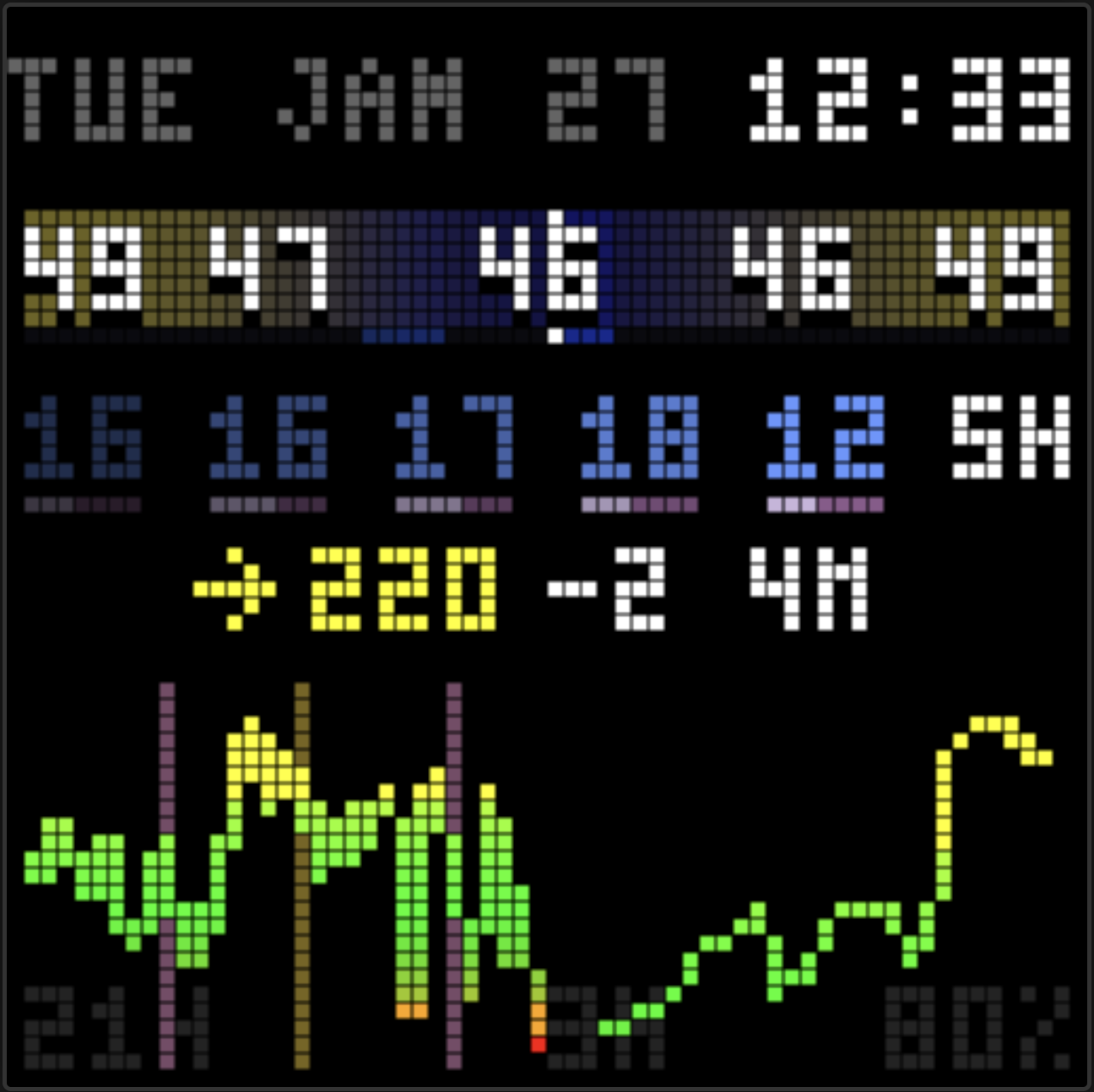
<p>The display now shows five days of insulin totals in a row. Each number shows total insulin for that day—bolus plus basal combined. A brightness gradient makes the pattern clear: oldest on the left (dim), newest on the right (bright).</p>

<p><img src="/assets/images/posts/pixoo-signage/insulin-display.png" alt="Five days of insulin totals with bolus/basal ratio bars" class="full-width" /></p>

<p>Below each number, a tiny ratio bar shows the bolus/basal split. Light purple for bolus, dark purple for basal. The bar width represents 100% of that day’s insulin. At a glance, I can see if the split is typical (roughly 50/50) or unusual.</p>

<p>The colors match Glooko’s own charts. Familiar visual language.</p>

<p>After the five totals, a latency indicator shows how fresh the bolus data is. “5m” means the last known bolus was 5 minutes ago. “2h” means we’re flying blind for a while. Useful context.</p>

<h2 id="time-in-range">Time in Range</h2>

<p><img src="/assets/images/posts/pixoo-signage/tir-display.png" alt="Time in Range display showing 79% TIR" class="float-left" /></p>

<p>I also added TIR—Time in Range—to the glucose sparkline. It’s a standard diabetes metric: what percentage of readings fall within the target range (70-180 mg/dL) over the last 24 hours? The number appears in the corner of the chart. Quick insight into how the day is going.</p>

<blockquote>
  <p>= 70% TIR is generally considered good. Higher is better. Seeing the number on the display makes it ambient. No need to open an app.</p>
</blockquote>

<h2 id="compact-everything">Compact Everything</h2>

<p>The original display used a 5x7 pixel font. Fine for readability, but it ate vertical space. I switched everything to a 3x5 font. Same information, fewer pixels. The sparkline chart grew from 21 pixels tall to 23. More room for trend detail.</p>

<h2 id="keeping-it-simple">Keeping it Simple</h2>

<p>Since my last writeup, I added and then removed Oura readiness scores. Nice idea and looked neat, but I wasn’t finding them useful in practice. The display should show what matters. For diabetes management, that’s glucose and insulin.</p>

<h2 id="still-running-cheap">Still Running Cheap</h2>

<p>The scraper adds a bit to the AWS bill—Puppeteer needs more memory than a typical Lambda—but the whole system still runs for about $4/month.</p>

<h2 id="whats-next">What’s Next</h2>

<p>The dashboard now covers glucose and insulin. The two main variables in diabetes management. Having them side by side on a glanceable display feels right.</p>

<p>I’m thinking about adding carb totals next. The data is already there from Glooko. Just needs a place on the display.</p>

<p>The scraper is also building a historical diabetes database in DynamoDB. Months of glucose, insulin, and carb data, all queryable. I’m curious what insights might emerge from pointing Claude Opus 4.5 at the trends—an AI endocrinologist on AWS Bedrock, offering succinct observations about patterns in the data? That’d be cool. 😎</p>

<p>The code is still open source on <a href="https://github.com/jwulff/signage">GitHub</a>.</p>

<p><strong>Update:</strong> <a href="/2026/02/02/pixoo-signage-insights-agent/">Part 3</a> adds an AI insights agent.</p>

<p>– John</p>]]></content><author><name></name></author><summary type="html"><![CDATA[Adding insulin pump data to the family glucose dashboard with Glooko integration and visual treatment tracking.]]></summary></entry><entry><title type="html">Family Dashboard: Weather, Glucose, and More in 64x64 Pixels</title><link href="https://johnwulff.com/2026/01/18/pixoo-signage/" rel="alternate" type="text/html" title="Family Dashboard: Weather, Glucose, and More in 64x64 Pixels" /><published>2026-01-18T00:00:00+00:00</published><updated>2026-01-18T00:00:00+00:00</updated><id>https://johnwulff.com/2026/01/18/pixoo-signage</id><content type="html" xml:base="https://johnwulff.com/2026/01/18/pixoo-signage/"><![CDATA[<p><img src="/assets/images/posts/pixoo-signage/web-emulator.png" alt="Web emulator showing the dashboard" class="hero" /></p>

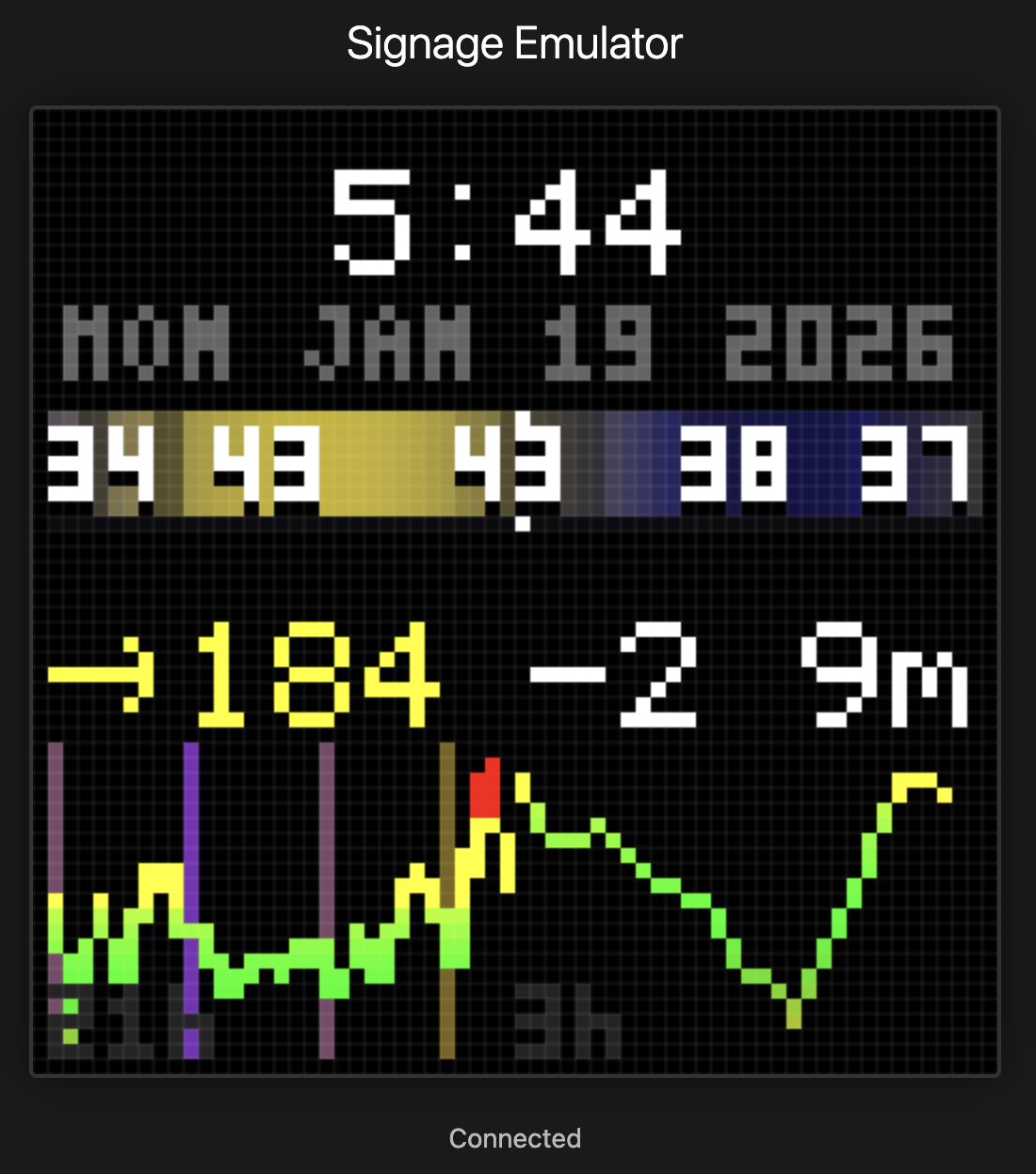
<p>I built a family dashboard on a 64×64 LED matrix. It shows time, weather, and glucose readings. Serverless AWS backend, $4/month of AWS to run, developed entirely with Claude Code. The display is always on, always current.</p>

<p>My daughter Abigail has Type 1 diabetes. Living with T1D means checking glucose numbers constantly. All our phones have widgets charting readings every 5 minutes from her Dexcom G7 continuous glucose monitor. We check. A lot. The numbers matter, and the trend between numbers can matter even more. Is she rising? Falling? Holding steady?</p>

<p>Phones are great tools. I can’t imagine managing diabetes without them. But it’s also great to have something visible at a glance when we’re at home. Something we can check without pulling out our phones.</p>

<h2 id="sugarpixel">SugarPixel</h2>

<p>Courtney found <a href="https://customtypeone.com/products/sugarpixel">SugarPixel</a>. We love it. We have several at home and set up a few more at Abigail’s school. Highly recommend if you’re managing diabetes.</p>

<p><img src="/assets/images/posts/pixoo-signage/sugarpixel.jpg" alt="SugarPixel displaying glucose reading" class="float-left" /></p>

<p>SugarPixel is a small LED display that shows glucose, trend arrows, and the delta from the last reading. Color-coded by range: red for lows, green for in-range, yellow and orange for highs. It connects to Dexcom’s servers and updates automatically. Glanceable. Always on. No phone required. It doesn’t show trend history, but it’s still our primary CGM monitor.</p>

<p>We even travel with one, paired with a <a href="https://store-us.gl-inet.com/collections/4g-lte-gatways/products/us-local-delivery-puli-gl-xe300-eg25-g-version">GL.iNet Puli</a> portable 4G router so it stays connected anywhere. The setup works well enough that it deserves its own post sometime.</p>

<p>But SugarPixel sparked an idea. What if we could have one with trend history? Or data for other parts of our life—weather, calendar, notifications? How fun would that be to build?</p>

<h2 id="failed-starts-and-found-solutions">Failed Starts and Found Solutions</h2>

<p><img src="/assets/images/posts/pixoo-signage/adafruit-matrix.jpg" alt="Adafruit 64x64 RGB LED Matrix" class="float-right" /></p>

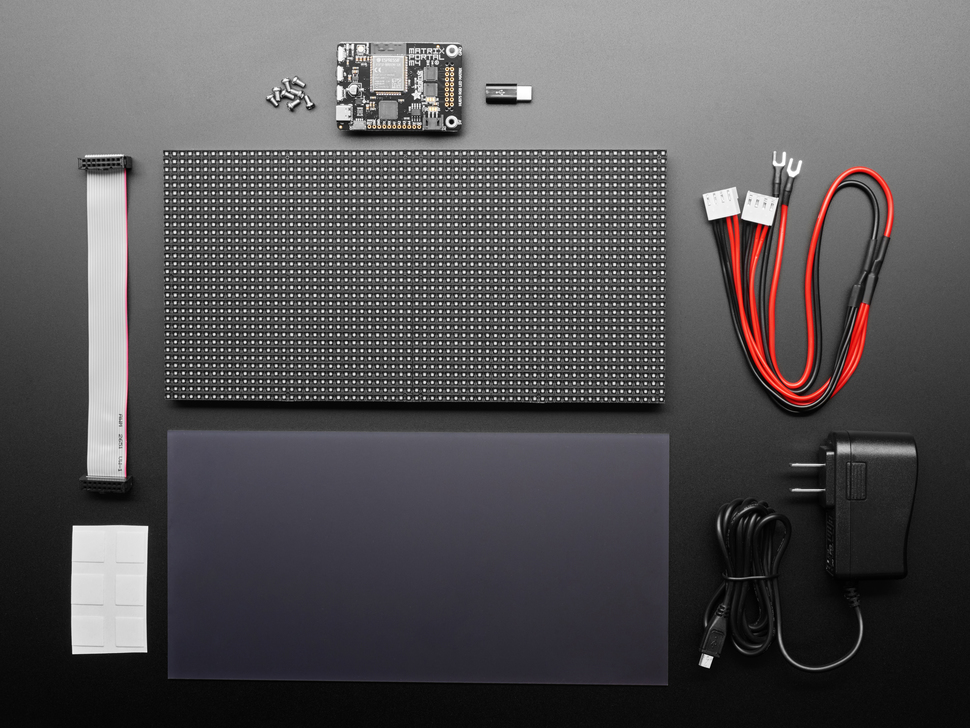
<p>I’d tried building an LED dashboard before. I bought an <a href="https://www.adafruit.com/product/4812">Adafruit 64x64 RGB LED Matrix</a>, figured I’d wire it up and write some code. The hardware setup was a pain. Power supplies, driver boards, level shifters. The controller needed tons of setup just to get on wifi. I wanted to write software, not debug electronics.</p>

<p>Then Aaron Patterson posted about the <a href="https://divoom.com/products/pixoo-64">Pixoo64</a>.</p>

<p>I’ve admired Aaron’s work for years. He’s a Ruby core committer who makes everything look fun. His blog, <a href="https://tenderlovemaking.com">tenderlovemaking.com</a>, is a mix of deep technical posts and playful projects.</p>

<p><img src="/assets/images/posts/pixoo-signage/pixoo64.webp" alt="Divoom Pixoo64 LED matrix display" class="float-left" /></p>

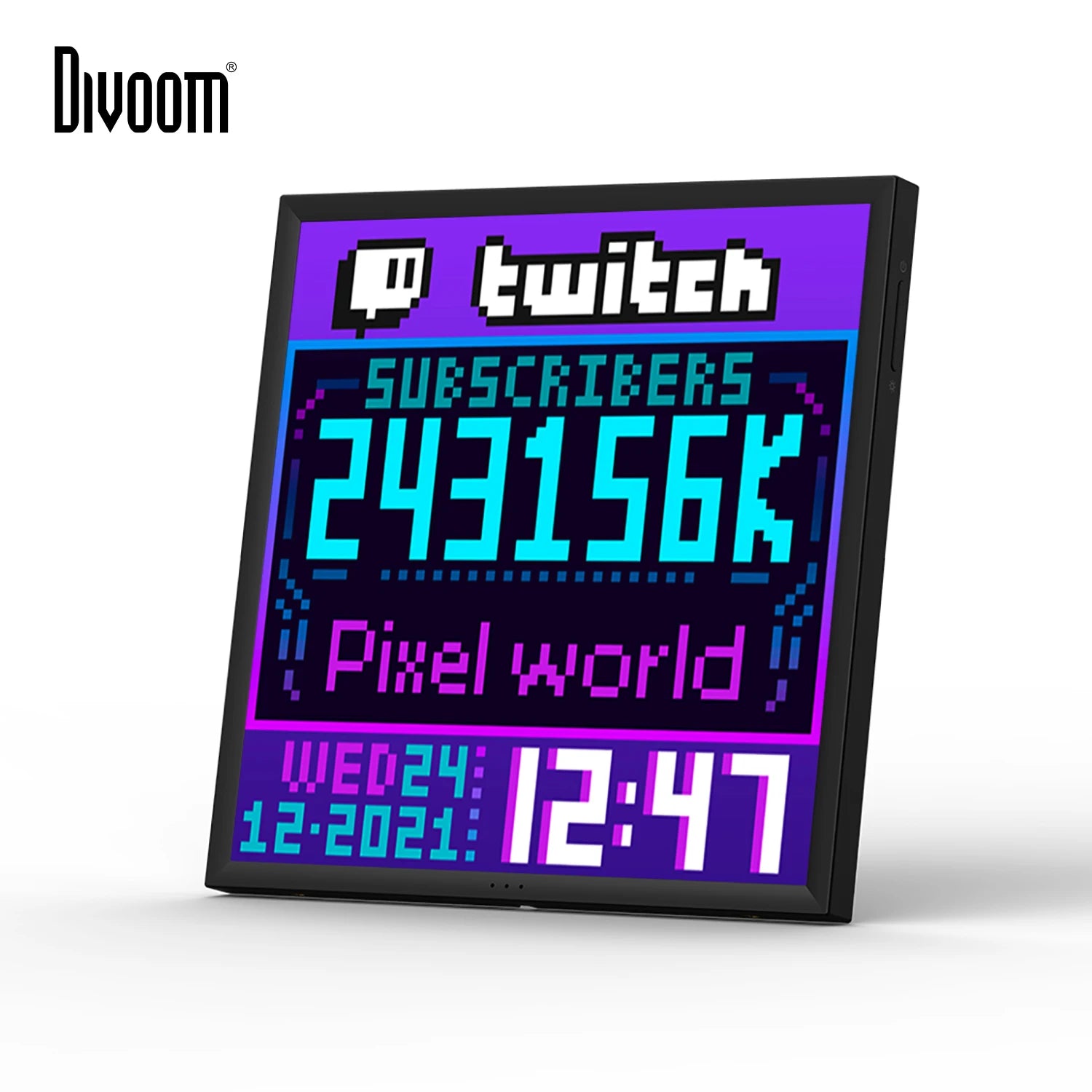
<p>He recently wrote about building <a href="https://tenderlovemaking.com/2026/01/01/pixoo64-ruby-client/">a Ruby client for the Pixoo64</a>. The Pixoo64 is a 64×64 LED matrix from Divoom with WiFi and an HTTP API. He uses it to display PM2.5 and CO2 levels in his office. “I learned that I need to open a window,” he wrote.</p>

<p>The Divoom handles everything I didn’t want to DIY: packaging, networking, power, display API. I just write software and push pixels over HTTP.</p>

<p>I set out to build a dashboard. Serverless, running on native AWS services. A multi-widget architecture where each data source lives independently. Minimal maintenance, bias for reliability. Developed entirely with Claude Code. Deployed through GitHub Actions. A pattern I love.</p>

<h2 id="cloud-to-countertop">Cloud to Countertop</h2>

<p>The Pixoo sits on my home network, behind NAT. I can’t push to it directly from the cloud. The device needs to pull, or something local needs to relay.</p>

<p>The solution: a serverless AWS backend that holds the glucose data, and a small relay running on my home network that pulls updates and pushes them to the Pixoo’s HTTP API.</p>

<p>Lambda functions fetch glucose readings from Dexcom. A WebSocket connection lets the relay subscribe to updates. When new data arrives, the relay renders it to the display. The whole thing runs for pennies a month. No server to maintain.</p>

<h2 id="the-stack">The Stack</h2>

<p><a href="https://sst.dev">SST v3</a> handles all the infrastructure as code. AWS provides the pieces: Lambda, API Gateway WebSocket, DynamoDB, EventBridge for scheduling, CloudFront for the web emulator. TypeScript everywhere, organized into packages for the core logic, Lambda functions, the relay, and a web interface. Monorepo with pnpm workspaces.</p>

<p>The architecture uses a compositor pattern. Each widget (glucose, clock, weather) publishes its data independently to SNS. A compositor Lambda combines them into a single 64×64 frame whenever anything changes. The relay doesn’t know about widgets. It just receives pixels.</p>

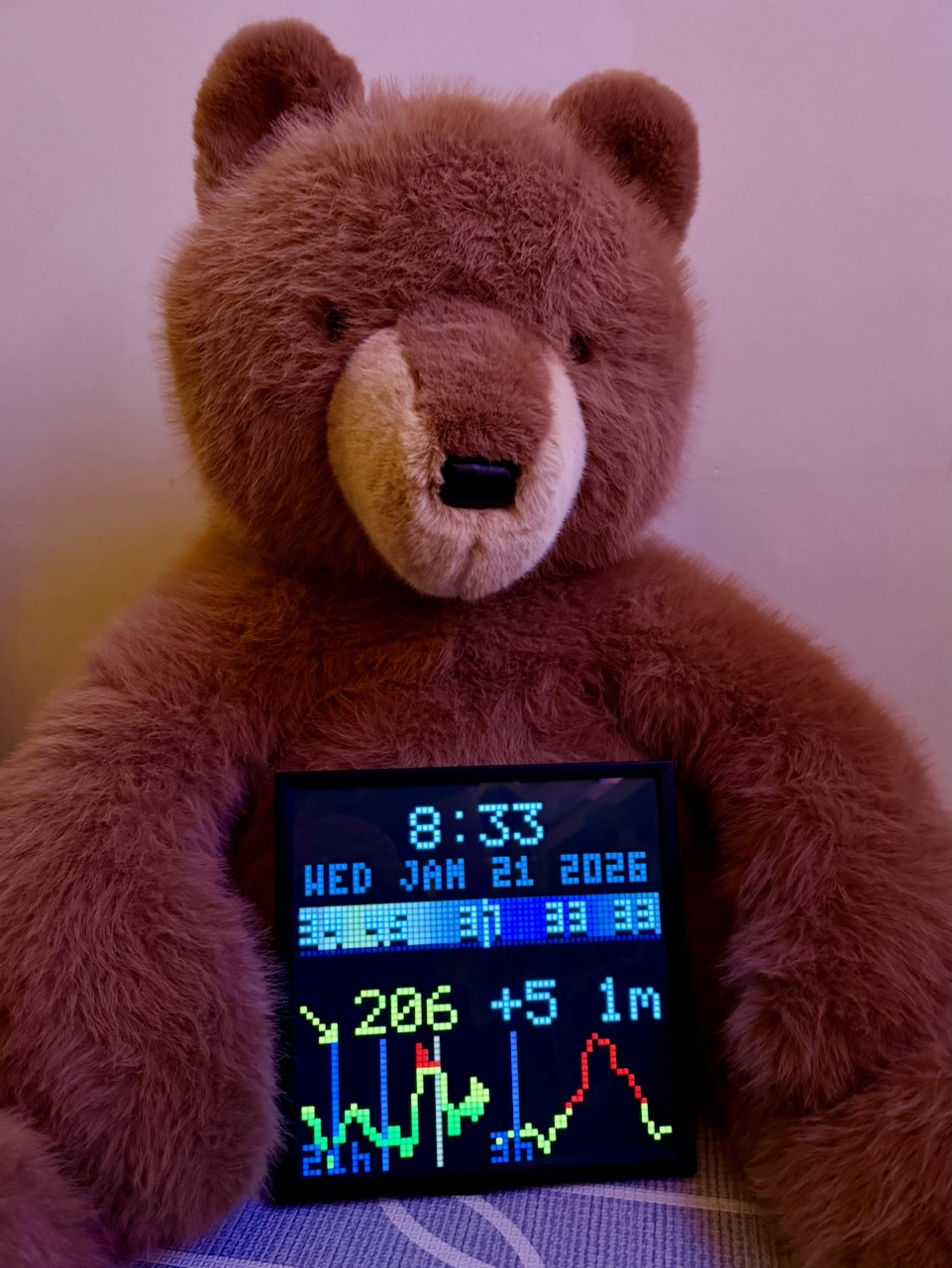
<p><img src="/assets/images/posts/pixoo-signage/bear-pixoo.jpeg" alt="Bear holding the Pixoo64 dashboard" class="float-right" /></p>

<p>The web emulator was a late addition. Testing display layouts without physical hardware made iteration much faster.</p>

<h2 id="always-on">Always On</h2>

<p>The relay needs to run constantly. I could leave my dev machine on, but that was bound to be unreliable and wasteful for a single WebSocket connection.</p>

<p>Once I got everything working locally, I deployed the relay to a $3.50/month AWS Lightsail nano instance. The catch: the Pixoo is on my home network, and Lightsail can’t reach it directly. The solution: WireGuard. The Lightsail instance tunnels into my home network through a VPN. It was easy to set up on my router, a Ubiquiti Dream Machine. The Pixoo thinks it’s talking to something local. The cloud thinks it’s pushing to the internet. Everyone’s happy.</p>

<p>The relay runs as a systemd service with automatic restart. If the WebSocket drops, exponential backoff with jitter spreads out reconnection attempts. Keepalive pings every five minutes prevent idle disconnects. The service won’t start until the WireGuard tunnel is up. It’s been running for days without intervention.</p>

<p>Total cost: about $4/month for Lambda, DynamoDB, and the Lightsail relay. Cheaper and easier than leaving a computer running.</p>

<h2 id="built-with-claude-code">Built With Claude Code</h2>

<p>I built this with Claude Code. The pairing made everything fast and fun. Claude handled the SST wiring, the Dexcom API integration, the WebSocket handshake, the binary protocol for pushing pixels to the display. I described what I wanted, Claude wrote the code, I tested and refined.</p>

<p>The worktree-based workflow helped too. Multiple branches in flight, each focused on a different piece: the Lambda functions, the relay, the display rendering. Claude could context-switch between them.</p>

<p>This project came together in a weekend.</p>

<h2 id="reading-the-dexcom">Reading the Dexcom</h2>

<p>Dexcom’s Share API is how followers receive glucose data. The same data that shows up on the Follow app. The system fetches the latest reading every minute, though Dexcom only pushes new values every five minutes.</p>

<p>The display shows the glucose value, a trend arrow, and the delta from the previous reading. Color-coded the same way SugarPixel does it: red below 70, green between 70 and 180, yellow up to 250, orange above that. The visual language is familiar. Anyone in the family can read it at a glance.</p>

<h2 id="patterns-over-time">Patterns Over Time</h2>

<p>Once the glucose number was working, I wanted trend data. SugarPixel shows the current reading. I wanted to see patterns at a glance.</p>

<p>I added a sparkline chart. But 24 hours of data compressed into 64 pixels loses detail. The last few hours matter most for decision-making: is she trending up from lunch? Coming down from a correction? So I split the chart in half. The left side shows 21 hours of compressed history. The right side shows the last 3 hours in detail. Recent data gets more pixels.</p>

<p>To do this I had to keep state. DynamoDB stores historical readings with automatic TTL cleanup. Every minute the compositor fetches 24 hours of history and renders both charts side by side.</p>

<p>I added vertical time markers at midnight, 6am, noon, and 6pm. Color-coded with a gradient from purple at night to yellow at midday. At a glance I can see when different readings happened. After-lunch highs are common with T1D. Now I can see them in context. The pattern matters as much as the number.</p>

<h2 id="weather-band">Weather Band</h2>

<p>Same idea, different data. I built a weather band showing temperature and conditions across 24 hours: 12 hours trailing, 12 hours forward. The center is now. A gradient shows daylight levels using the same purple-to-yellow curve as the glucose chart. Cloud cover dims the band. Rain adds a blue tint. Temperature numbers overlay at key points.</p>

<p>Glancing at the display, I can see where the weather is going relative to where it was. Warmer tomorrow. Rain coming this afternoon. The same ambient information principle: no interaction required, just a glance.</p>

<h2 id="a-family-dashboard">A Family Dashboard</h2>

<p>Glucose is the starting point, not the whole vision. A 64×64 grid has room for more.</p>

<p>The next addition: Oura Ring readiness scores. Courtney and I both wear Ouras. It’d be fun to have the top corner show our readiness scores, color-coded by how recovered we are. Two health metrics from two different sources, one glanceable display.</p>

<p>Then maybe more weather, calendar events, or a doorbell notification. Multiple data sources, composed onto one display. Perhaps other Pixoos in other rooms, each showing a different mix. The kitchen gets glucose and weather. The office gets calendar and glucose.</p>

<h2 id="open-source">Open Source</h2>

<p>I’ve open-sourced it on <a href="https://github.com/jwulff/signage">GitHub</a>.</p>

<p>Ambient displays change how you interact with information. Or rather, how you don’t interact. The best interface is no interface. Just information, always visible, waiting for a glance.</p>

<p><strong>Update:</strong> <a href="/2026/01/27/pixoo-signage-insulin-tracking/">Part 2</a> adds insulin tracking and pump integration.</p>

<p>– John</p>]]></content><author><name></name></author><summary type="html"><![CDATA[Building a family glucose dashboard on Pixoo64 with serverless AWS and Claude Code.]]></summary></entry><entry><title type="html">Apple Watch to Obsidian via Claude Code</title><link href="https://johnwulff.com/2026/01/11/voice-memos-to-second-brain/" rel="alternate" type="text/html" title="Apple Watch to Obsidian via Claude Code" /><published>2026-01-11T00:00:00+00:00</published><updated>2026-01-11T00:00:00+00:00</updated><id>https://johnwulff.com/2026/01/11/voice-memos-to-second-brain</id><content type="html" xml:base="https://johnwulff.com/2026/01/11/voice-memos-to-second-brain/"><![CDATA[<p>I talk to myself a lot. Not in a concerning way, more like a running commentary on life, ideas, things I need to remember. The problem is, those thoughts used to disappear into the ether. Now they end up in my second brain.</p>

<h2 id="one-button-recording">One Button Recording</h2>

<p>I wear an Apple Watch Ultra. On the side there’s an action button. Big, orange, impossible to miss. I set it to record Voice Memos. One press and I’m recording. Walking to lunch, driving to work, lying in bed at 2am with an idea I’ll definitely forget by morning. Press, talk, done.</p>

<p>The memos pile up. Some are grocery lists. Some are half-baked product ideas. Some are specific thoughts about projects I’m working on. All of them were archived in the Voice Memos app. A couple times a week, I’d open my laptop where iCloud had synced the recordings. I’d go into the Voice Memos app, hit transcribe on each recording, copy the transcription, paste it into my second brain, then process with Claude Code. It worked fine but those steps quickly got monotonous.</p>

<h2 id="my-second-brain">My Second Brain</h2>

<p>My vault is an <a href="https://obsidian.md">Obsidian</a> folder—markdown files organized by date and topic, all linked together with <code class="language-plaintext highlighter-rouge">[[wikilinks]]</code>. Notes about people, places, trips, recipes, projects. Everything connected. I’ve taught Claude Code how the vault works via a <code class="language-plaintext highlighter-rouge">CLAUDE.md</code> file with all my naming conventions, folder structures, and linking rules.</p>

<h2 id="too-much-friction">Too Much Friction</h2>

<p>The gap between a voice memo on my watch and a note in my vault was all manual. Transcribe, copy, paste, file, link. Friction kills habits, and this had too much friction.</p>

<p>I wanted to tell Claude: “Listen to my voice memos from today and process them into my vault.”</p>

<p>So I (with Claude Code) built the MCP tools to make that possible.</p>

<h2 id="what-i-built">What I Built</h2>

<p><a href="https://modelcontextprotocol.io">MCP</a> (Model Context Protocol) is Anthropic’s standard for giving AI assistants access to external tools and data. I built two servers:</p>

<p><strong><a href="https://github.com/jwulff/apple-voice-memo-mcp">apple-voice-memo-mcp</a></strong> reads directly from the Voice Memos database on macOS. It can list memos, get metadata, extract audio, pull existing transcripts, and transcribe on-device using Apple’s speech recognition. No cloud APIs, no sending my rambling thoughts to third parties. As far as I can tell, nobody else has built Voice Memos access for MCP.</p>

<p><strong><a href="https://github.com/jwulff/whisper-mcp">whisper-mcp</a></strong> handles transcription with OpenAI’s Whisper model, running locally. There are several Whisper MCP servers out there. Mine is as light as possible, built to pair with the voice memo server above.</p>

<h2 id="now-i-just-talk">Now I Just Talk</h2>

<p>Now my note-taking routine includes a simple command in Claude Code:</p>

<blockquote>
  <p>“Process my voice memos.”</p>
</blockquote>

<p>Claude finds the recordings, transcribes them, figures out what each one is about, and files them appropriately. A random thought about a food project goes to my cooking folder. A reminder to call someone becomes a task. A shower thought about some code I’m writing gets appended to that project’s notes.</p>

<p>The friction is gone. I talk, and the thoughts find their way home.</p>

<p>I lose ideas all the time. The gap between having a thought and capturing it is where most of them die. The watch closes that gap. The MCP servers close the gap between capture and organization.</p>

<h2 id="get-the-tools">Get the Tools</h2>

<p>Both servers are in the <a href="https://registry.modelcontextprotocol.io">official MCP registry</a> and on npm. Add them to your Claude Desktop config (<code class="language-plaintext highlighter-rouge">~/Library/Application Support/Claude/claude_desktop_config.json</code>):</p>

<div class="language-json highlighter-rouge"><div class="highlight"><pre class="highlight"><code><span class="p">{</span><span class="w">
  </span><span class="nl">"mcpServers"</span><span class="p">:</span><span class="w"> </span><span class="p">{</span><span class="w">
    </span><span class="nl">"apple-voice-memo-mcp"</span><span class="p">:</span><span class="w"> </span><span class="p">{</span><span class="w">
      </span><span class="nl">"command"</span><span class="p">:</span><span class="w"> </span><span class="s2">"npx"</span><span class="p">,</span><span class="w">
      </span><span class="nl">"args"</span><span class="p">:</span><span class="w"> </span><span class="p">[</span><span class="s2">"-y"</span><span class="p">,</span><span class="w"> </span><span class="s2">"apple-voice-memo-mcp"</span><span class="p">]</span><span class="w">
    </span><span class="p">},</span><span class="w">
    </span><span class="nl">"whisper-mcp"</span><span class="p">:</span><span class="w"> </span><span class="p">{</span><span class="w">
      </span><span class="nl">"command"</span><span class="p">:</span><span class="w"> </span><span class="s2">"npx"</span><span class="p">,</span><span class="w">
      </span><span class="nl">"args"</span><span class="p">:</span><span class="w"> </span><span class="p">[</span><span class="s2">"-y"</span><span class="p">,</span><span class="w"> </span><span class="s2">"whisper-mcp"</span><span class="p">]</span><span class="w">
    </span><span class="p">}</span><span class="w">
  </span><span class="p">}</span><span class="w">
</span><span class="p">}</span><span class="w">
</span></code></pre></div></div>

<p>For Claude Code, add the same to <code class="language-plaintext highlighter-rouge">~/.claude/settings.json</code> or your project’s <code class="language-plaintext highlighter-rouge">.mcp.json</code>.</p>

<p><strong>Requirements:</strong> macOS Sonoma+, Node.js 18+, Full Disk Access permission. For whisper-mcp, also <code class="language-plaintext highlighter-rouge">brew install whisper-cpp ffmpeg</code>.</p>

<p>Source code is MIT licensed on GitHub:</p>

<ul>
  <li><a href="https://github.com/jwulff/apple-voice-memo-mcp">apple-voice-memo-mcp</a></li>
  <li><a href="https://github.com/jwulff/whisper-mcp">whisper-mcp</a></li>
</ul>

<p>If you have ideas for improvements, PRs are welcome.</p>

<p>The best tools are the ones that disappear. Press a button, talk, and trust that the thought will end up where it belongs.</p>

<p>– John</p>]]></content><author><name></name></author><summary type="html"><![CDATA[Building two MCP servers to capture voice memos and sync them into Obsidian.]]></summary></entry></feed>